Top Checks vs. Middle Checks vs. Bottom Checks: Which Format Is Right for Your Business?
Learn the differences between top, middle and bottom business checks, including software compatibility, voucher placement, envelopes and the best uses for each format.
Learn how check placement affects accounting software compatibility,voucher organization, envelopes and everyday payment processing so youcan choose the right business check format with confidence.
Why Business Check Format Matters
Business checks may look similar at first glance, but the position of thecheck on the sheet can make an important difference. Top, middle andbottom checks are designed to work with different accounting programs,voucher layouts, printing processes and recordkeeping preferences.
Selecting the wrong format can lead to printing alignment problems,inconvenient voucher placement or incompatibility with your currentaccounting software. Choosing the correct format before ordering helpsprevent wasted checks and makes payment processing easier for youraccounting team.
Most computer business checks are printed on an 8½ × 11-inch sheet. Thepayment check occupies one section of the page, while the remainingsections are normally used as vouchers or payment stubs. These voucherscan contain invoice numbers, payment details, account information andcopies for your business records.
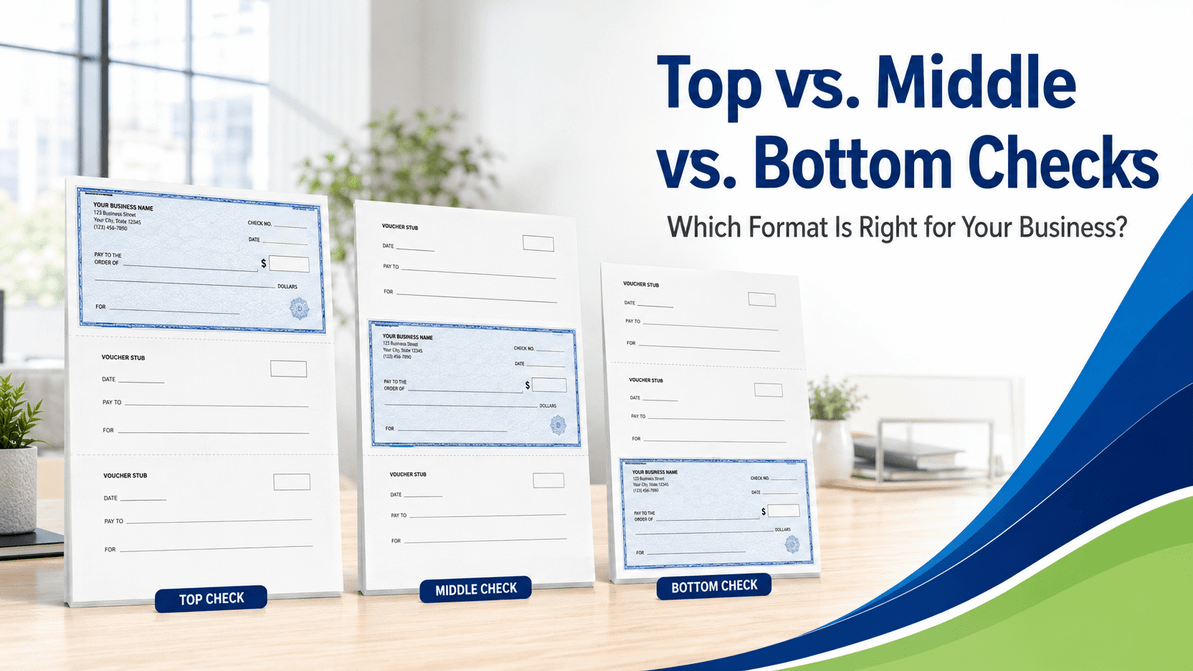
The primary difference among the three formats is simple: the negotiablecheck is positioned at the top, middle or bottom of the sheet. However,that placement determines how the document works with your software,printer and filing process.
Business Check Formats at a Glance
Top Checks
The check appears at the top of the page with two vouchers positionedbelow it.
- Widely used by small and mid-sized businesses
- Common with popular accounting programs
- Convenient when the check is removed first
Middle Checks
The check appears between an upper voucher and a lower voucher.
- Keeps one voucher above and one below the check
- Useful for specific software-generated layouts
- Supports organized recipient and company copies
Bottom Checks
The check appears at the bottom with two vouchers positioned above it.
- Common in certain accounting and payroll systems
- Payment details appear before the check
- Useful when vouchers are reviewed first
What Are Top Business Checks?
A top business check places the negotiable check in the upper portion ofthe 8½ × 11-inch sheet. Two voucher sections appear below the check. Onevoucher can accompany the payment, while the other can be retained forinternal records.
Top checks are popular because the payment portion is immediately visibleand can be detached first. This layout can feel natural for employees whoprepare, review, sign and mail payments in a traditional top-to-bottomworkflow.
The two vouchers provide room for information such as invoice numbers,amounts paid, customer or vendor account references and payment notes.Depending on the software and check design, each voucher may repeat thesame information or serve a different recordkeeping purpose.
Top checks may be a good choice when:
- Your accounting software is configured for a check-at-top layout.
- You currently use top checks and want to maintain the same workflow.
- You prefer to detach or sign the check before reviewing the vouchers.
- You want two payment stubs positioned beneath the check.
- Your envelope and folding process is designed for top checks.
Top checks are available as bothblank business checksfor businesses that print account information in-house andimprinted business checkswith company and banking information already printed.
What Are Middle Business Checks?
Middle business checks place the negotiable check in the center of thepage. One voucher appears above the check, and another voucher appearsbelow it. This creates a balanced three-part document with payment detailssurrounding the check.
Some accounting programs and business payment systems are specificallydesigned for this arrangement. The upper voucher may provide details forthe recipient, while the lower voucher can be retained by the issuingbusiness. Exact usage depends on the software template and internalprocess.
A middle-check layout may also make payment information easier to reviewbefore the check is detached. For example, an employee can examine theupper payment details, verify the check amount and then retain the lowervoucher as an accounting record.
Middle checks may be a good choice when:
- Your accounting software requires a check-in-middle format.
- You prefer one voucher above and one voucher below the payment.
- Your existing check stock already uses the middle format.
- Your filing process relies on a bottom voucher as the company copy.
- Your payment documents are folded or inserted using a middle-check layout.
Middle checks should be purchased only after confirming the exactsoftware format. Even when the check dimensions are the same, voucherfields and perforation positions can vary among check products.
What Are Bottom Business Checks?
Bottom business checks position the negotiable check at the lower part ofthe sheet. Two voucher sections appear above it. This format allows thepayment details to be read before reaching the check itself.
A check-at-bottom layout is frequently used by businesses whose accountingsoftware produces one or two detailed remittance sections above thepayment. These vouchers may show invoices paid, deductions, accountreferences, payroll details or other transaction information.
Bottom checks can work especially well when payment documentation requiresmore attention than the negotiable check. An employee or recipient canreview the voucher details first and then detach the check from the bottomof the page.
Bottom checks may be a good choice when:
- Your accounting or payroll software uses a check-at-bottom template.
- You want two remittance vouchers to appear before the check.
- Your organization already uses bottom checks and matching envelopes.
- Your payment-review process begins with the invoice or voucher details.
- You need to remain consistent with established files and procedures.
Top vs. Middle vs. Bottom Checks
All three formats can provide a professional payment document. The rightchoice depends less on appearance and more on compatibility with yourexisting business systems.
| Feature | Top Checks | Middle Checks | Bottom Checks |
|---|---|---|---|
| Check position | Top of the sheet | Center of the sheet | Bottom of the sheet |
| Voucher arrangement | Two vouchers below | One above and one below | Two vouchers above |
| Best reason to choose it | Software uses a top-check template | Software uses a middle-check template | Software uses a bottom-check template |
| Typical workflow | Check is viewed or removed first | Check is surrounded by payment records | Payment details are reviewed first |
| Recordkeeping | Two lower payment stubs | Upper and lower payment stubs | Two upper payment stubs |
| Software requirement | Top-check print layout | Middle-check print layout | Bottom-check print layout |
| Envelope consideration | Window placement must match the folded check and address location. | ||
How to Choose the Correct Business Check Format
The safest approach is to begin with your accounting software rather thanthe appearance of the check. Your software controls where the payee,amount, date, voucher information and account details print on the sheet.
1. Check your accounting software settings
Review the check-printing or forms section of your accounting program.Look for terms such as “voucher check,” “check at top,” “check in middle”or “check at bottom.” Some programs may list compatible product numbers orcheck styles.
2. Compare your current checks
When reordering, examine the check stock you already use. Confirm theposition of the negotiable check, perforations, sheet dimensions andsecurity features. Reordering the same compatible layout is usually easierthan changing formats.
3. Run an alignment test
Print a sample payment on plain paper before using live check stock. Placethe printed sheet over an existing check and hold both pages toward alight source. Confirm that all fields align correctly and that no importantinformation crosses a perforation.
4. Check your envelope compatibility
Check position and address placement affect how the document appearsthrough a window envelope. A check that prints correctly may still requirea different folding pattern or envelope window location.
Review thebusiness envelope collectionwhen choosing envelopes for checks, statements and payment documents.
5. Decide between blank and imprinted checks
Format and imprinting are separate decisions. Blank checks allow compatiblebusinesses to print bank and company information using secure check-printingsoftware and suitable MICR equipment. Imprinted checks arrive with specifiedbusiness and banking information already printed.
Businesses should choose the option that matches their software, equipment,security procedures and ordering needs.
Already know your required format?
Browse business checks and compare blank, imprinted and manual optionsfor your payment process.
Common Business Check Ordering Mistakes
Choosing a format based only on appearance
A preferred layout will not help if it does not match your accountingsoftware. Compatibility should always come first.
Assuming every voucher check is identical
Products may differ in perforation placement, voucher design, securityfeatures and software compatibility. Compare the full specificationsinstead of relying only on the words “voucher check.”
Changing check formats without updating the software
Switching from top to middle or bottom checks normally requires acorresponding software-template change. Without that change, the payee,amount and voucher details may print in the wrong areas.
Forgetting about envelopes
The recipient address must appear correctly through the envelope window.Confirm the folding pattern and window placement before ordering a largequantity of envelopes.
Skipping a test print
A plain-paper test is one of the easiest ways to catch alignment problemsbefore loading secure check stock into the printer.
Ordering the wrong security level
Check layout and check security are separate considerations. After choosingthe correct top, middle or bottom format, compare the available securityprotections and select the level appropriate for your organization.
Choice Checks organizes business checks usingGood, Better and Best security levels to make thosedifferences easier to understand.
Software Compatibility and Check Printing
Many accounting systems support more than one check style, but the defaultformat varies. A software update, custom report or saved printing templatemay also change the layout used by your organization.
Before placing an order, confirm the exact check position specified in thesoftware. When possible, compare the software's sample layout with theproduct diagram or existing check stock.
Printer settings matter as well. Scaling should normally remain at 100percent or actual size unless the software provides different instructions.Options such as “fit to page” can shrink the output and cause alignmenterrors.
Businesses printing bank information on blank checks should also verifytheir equipment, toner, software and financial institution requirements.Standard office printing and MICR check printing are not automatically thesame process.
Frequently Asked Questions
What is the most common business check format?
Top checks are widely used, but there is no single correct format forevery business. The right format is the one supported by youraccounting software and payment workflow.
Can I use top checks when my software prints bottom checks?
Not without changing the software's print layout. Otherwise, the payee,amount and voucher information will likely print in the wrong places.
Are top, middle and bottom checks the same size?
Many computer business checks are supplied on 8½ × 11-inch sheets, butperforations, check dimensions and voucher layouts can differ. Alwaysreview the individual product specifications.
Do all business checks include two vouchers?
Many top, middle and bottom computer checks include two voucher areas,but other layouts are available. Manual checks and some specializedchecks use different formats.
What information appears on a check voucher?
A voucher may include the payee, payment date, check number, invoicenumbers, amounts paid, deductions, account references and otherremittance details generated by the accounting software.
Can I change from top checks to middle checks?
Yes, provided your software supports the middle-check format and theprint template is changed correctly. Test the new layout on plainpaper before printing a live check.
Do I need different envelopes for each format?
Possibly. Envelope compatibility depends on the folded document,recipient-address placement and window location. Confirm compatibilitybefore ordering envelopes in bulk.
Should I order blank or imprinted checks?
Blank checks may be appropriate for businesses equipped to print thenecessary company and banking information securely. Imprinted checksarrive with specified information already printed. Choose according toyour software, equipment and internal security process.
How can I test check alignment?
Print a sample on plain paper at actual size. Place it over an existingcheck sheet and hold both toward a light source to compare the fieldpositions, perforations and address placement.
Related Choice Checks Resources
Continue comparing business payment products and supplies with theserelated collections and resources.
Choose Business Checks With Confidence
Start with your accounting software, confirm the required check positionand compare the available format and security options before ordering.Choice Checks provides business-focused payment supplies for organizationsthat need dependable products and professional service.
Browse Business ChecksKeep Deposits Organized
Shop deposit slips, books, tickets, and bags designed for accurate business banking records.
Recent Posts
-
Pressure Seal Checks for Accounts Payable and Vendor Payments
Accounts Payable Workflow Guide Pressure Seal Checks for Accounts Payable and Vendor Pay …Oct 24th 2026 -
Best Pressure Sealer Machines for Checks, Invoices & Business Mailings
Best Pressure Sealers Machines We have the best pressure sealer machines online now! Time-sa …Oct 24th 2026 -
Business Checks keeps your business organized
Business Checks keeps your business organized. Business Checks - Variety to choose from for your bu …Oct 24th 2026