Quickbooks Imprinted Business Checks
Business Checks Designed for QuickBooks Users
Shop professionally imprinted business checks available in popular layouts for QuickBooks accounting software. Choose from multiple check positions, security levels, colors, and quantities for your business needs.
- Product
- Qty in Cart
- Quantity
- Price
- Subtotal
-

Prismatic Star With Hologram Imprinted Business Check on Top
$229.95 - $6,504.95Save 5% on Eligible Orders $250+Prismatic Star with Hologram Imprinted Business Checks on Top- Availability:
- Usually Ships in 1-2 Business Days After Proof Approval
- Check Position:
- Top
- Security Level:
- Best
- Check Design:
- Prismatic Star
$229.95 - $6,504.95
Choose the Right QuickBooks-Compatible Business Check
Choose the format that best fits your accounting workflow. This collection includes QuickBooks-compatible checks on top and 3-up imprinted business checks, along with multiple security and imprinting options.
QuickBooks Check on Top
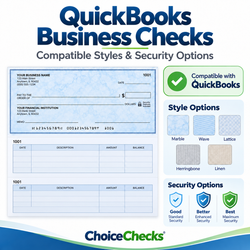
The check prints at the top of the page with voucher or record sections underneath. This is a popular format for businesses using QuickBooks-compatible business checks.
Popular QuickBooks Format3-Up Imprinted Checks
Three imprinted business checks are arranged on each sheet, making this format a practical choice for businesses that issue multiple checks and do not need voucher sections.
3 Checks Per SheetSecurity Options
Choose from available check styles and security levels based on your business needs. Product pages show the available security features and designs for each check.
Multiple Security LevelsBusiness Imprinting
Add your business information to create a professional finished check. Available personalization varies by product and may include business details, colors, logos, and other imprint options.
Professional PersonalizationQuickBooks Business Checks FAQs
Find answers about QuickBooks-compatible business checks, check layouts, imprinting, security options, reorders, and choosing the right format for your business.
1. What is a QuickBooks-compatible business check?
2. What is the difference between Check on Top and 3-Up Imprinted Checks?
3. How do I know which QuickBooks check format I need?
4. Can I add my business information to the checks?
5. What security options are available?
6. Can I reorder the same checks I purchased before?
7. Are orders reviewed before production?
8. Can I use these checks with accounting software other than QuickBooks?
9. What should I do if I am not sure which check to order?
Helpful Resources for Choosing Business Checks
Use these resources to compare check formats, review product options, and get help before placing your order.
QuickBooks-Compatible Business Checks for Professional Business Payments
Choice Checks offers professionally imprinted business checks in formats commonly used with QuickBooks accounting software. Businesses can choose from QuickBooks-compatible Check on Top formats and 3-Up Imprinted Business Checks, along with a variety of colors, quantities, designs, and security options.
Selecting the correct business check format is important because accounting software is designed to print information in specific positions on the page. Before ordering, compare your current checks with the product images and descriptions to confirm the check position, sheet layout, and format required for your business.
QuickBooks Check on Top Business Checks
Check on Top business checks place the printable check at the top portion of the sheet with voucher or record sections below. This format is widely used by businesses that want supporting accounting information printed with each payment.
Choice Checks offers multiple Check on Top designs with different security levels and personalization options. Available features vary by product, so review each product page carefully before selecting your quantity, color, security level, and imprinting options.
3-Up Imprinted Business Checks
Businesses that do not need voucher sections may prefer 3-Up Imprinted Business Checks. These sheets contain three checks per page and provide a practical format for businesses that issue multiple checks and maintain payment records separately.
As with Check on Top products, customers should confirm that the 3-up format matches their accounting and printing requirements before placing an order.
Business Check Security and Personalization
Business checks are available with different security features, designs, and paper options. Depending on the product selected, available features may include security backgrounds, warning indicators, controlled paper features, and other fraud-deterrent elements.
Imprinted checks can also be personalized with business information. Available personalization varies by product and may include your company name, address, logo, check color, and other imprint details. Always review your information carefully before submitting an order for production.
Ordering QuickBooks-Compatible Checks from Choice Checks
Choice Checks serves businesses nationwide with commercial checks, tax forms, deposit supplies, envelopes, pressure seal products, business stamps, and related accounting supplies. Business check orders may be reviewed as part of our order verification procedures before production.
If you are unsure which check format matches your current setup, compare your existing checks with the product images on this page before ordering. You can also contact Choice Checks at 478-910-1011 for assistance selecting the appropriate business check format.