
Top, Middle, and Bottom Checks Explained: Which Position Is Right for Your Business?
```html
Top, Middle, and Bottom Checks Explained: Which Position Is Right for Your Business?
Learn the differences between top, middle, and bottom business checks and discover which format works best for your accounting software, filing system, and business workflow.
When ordering blank business checks, one of the most common questions business owners ask is: Should I choose top checks, middle checks, or bottom checks?
While all three formats contain the same banking information and perform the same function, the position of the check on the page can significantly impact printing convenience, bookkeeping efficiency, filing practices, and software compatibility.
Businesses using QuickBooks®, Sage, Microsoft Dynamics, and other accounting programs often select a check position based on how their accounting software prints checks. Choosing the wrong format can lead to alignment problems, wasted check stock, and printing frustration.
In this guide, we'll explain the differences between top, middle, and bottom checks, discuss the advantages of each format, and help you determine which position is best for your business.
What Are Top, Middle, and Bottom Checks?
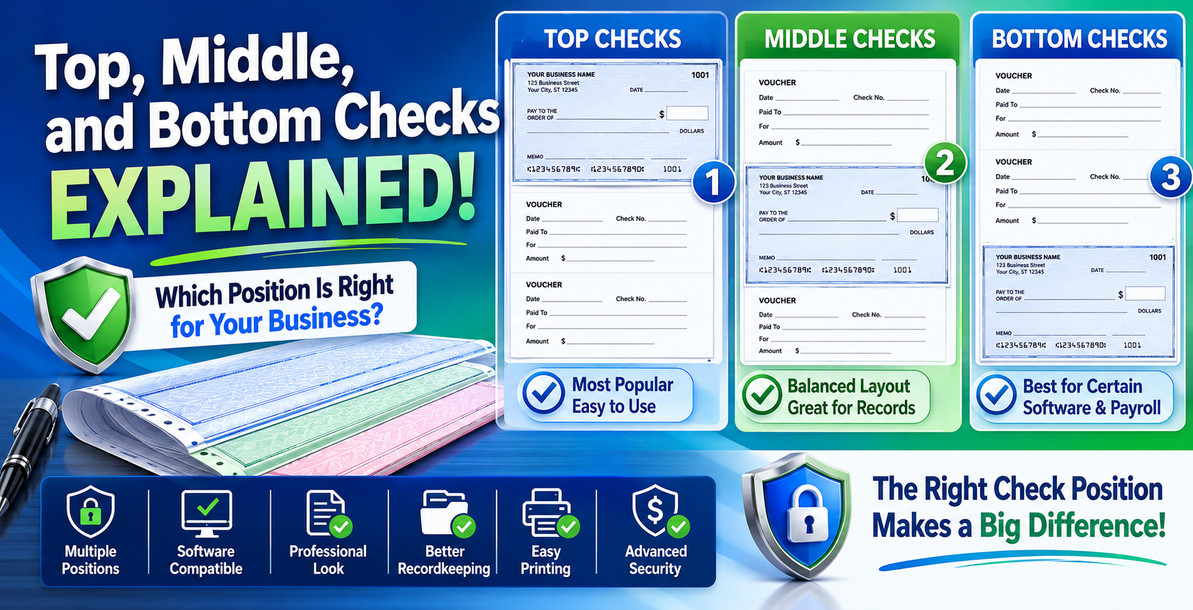
Most blank business checks are printed on standard 8.5" x 11" sheets containing three check positions.
The difference is simply where the negotiable check appears on the page:
- Top Checks – The check appears at the top of the sheet.
- Middle Checks – The check appears in the center of the sheet.
- Bottom Checks – The check appears at the bottom of the sheet.
The remaining portions of the page typically contain vouchers or stubs that provide payment information and recordkeeping details.
Top Checks: The Most Popular Format
Top blank business checks are the most commonly used format for businesses throughout the United States.
With top checks, the negotiable document appears at the upper portion of the page while the vouchers are located below.
Many accounting software systems are configured by default to print top-position checks because they are widely accepted and easy to process.
Benefits of Top Checks
- Most common business format
- Compatible with many accounting systems
- Easy to review before signing
- Convenient for filing payment records
- Popular among small businesses
Businesses transitioning from traditional manual bookkeeping often find top checks familiar and easy to use.
If you're uncertain which position your software requires, top checks are frequently the safest starting point.
Middle Checks: Balanced and Efficient
Middle blank business checks place the negotiable check in the center section of the page.
A voucher appears above and below the check, creating a balanced layout that provides detailed payment information on both sides.
Many businesses appreciate this format because it creates organized documentation and provides clear remittance information.
Benefits of Middle Checks
- Excellent recordkeeping capabilities
- Voucher information above and below
- Professional appearance
- Popular with accounting departments
- Works well for vendor payments
Companies processing a high volume of invoices often prefer middle checks because they allow for more comprehensive payment documentation.
Bottom Checks: Ideal for Certain Software Applications
Bottom blank business checks position the negotiable check at the bottom of the sheet.
The payment stubs appear above the check, allowing users to review detailed transaction information before the check is detached.
Some accounting systems and payroll applications are specifically configured to print bottom-position checks.
Benefits of Bottom Checks
- Compatible with specific accounting software
- Easy review of payment details
- Efficient payroll processing
- Convenient for accounts payable departments
- Strong recordkeeping capabilities
Businesses should always verify software compatibility before ordering bottom-position checks.
Software Compatibility Matters
One of the most important factors when selecting check position is accounting software compatibility.
Before ordering checks, verify whether your accounting system requires:
- Top checks
- Middle checks
- Bottom checks
Many businesses using QuickBooks® can choose from multiple formats depending on their printer setup and software configuration.
Always print a sample alignment page before placing a large order.
Security Features Are Available in All Positions
One common misconception is that one check position is more secure than another.
In reality, top, middle, and bottom checks can all include the same advanced security features.
When purchasing checks, look for:
- Microprinting
- Artificial Watermarks
- Chemical Protection
- Security Screens
- Warning Bands
- Toner Adhesion Technology
- Prismatic Backgrounds
The position of the check does not affect security. Security depends on the quality of the check stock itself.
Which Position Is Right for Your Business?
The best check position depends on how your organization processes payments.
Choose Top Checks If:
- You want the most common format.
- Your software recommends top checks.
- You prefer traditional layouts.
- You are unsure which position to select.
Choose Middle Checks If:
- You need detailed remittance records.
- You process many vendor payments.
- You prefer balanced voucher layouts.
Choose Bottom Checks If:
- Your software specifically requires bottom checks.
- You run payroll frequently.
- You prefer payment details above the negotiable document.
Find the Right Blank Business Checks for Your Company
Whether you choose top, middle, or bottom checks, selecting the correct format can improve efficiency, reduce printing issues, and simplify recordkeeping.
At Choice Checks, we offer a complete selection of blank business checks, including top checks, middle checks, and bottom checks available in multiple colors, styles, and security levels.
By selecting the proper position and security level, your business can streamline payment processing while protecting against fraud.
```
Recent Posts
-
Top 5 Security Features Every Business Check Should Have
```html Top 5 Security Features Every Business Check Should Have Protect your business from check …Jun 4, 2026 -
Business Check Security Levels Explained: Good, Better, and Best Security Checks
Business Check Security Levels Explained: Good, Better, and Best Learn the difference between Go …Jun 4, 2026 -
Top, Middle, and Bottom Checks Explained: Which Position Is Right for Your Business?
```html Top, Middle, and Bottom Checks Explained: Which Position Is Right for Your Business? Learn …Jun 4, 2026